Hoopla Info
What is Hoopla?
Hoopla is a web and mobile library streaming platform for audio books, comics, music and TV. Libraries purchase access for their patrons. The 2026 fiscal year has a budget of $80,000. That budget is broken into monthly amounts, then daily amounts to determine how much can be spent per day. Any daily remainder rolls over to the next day.
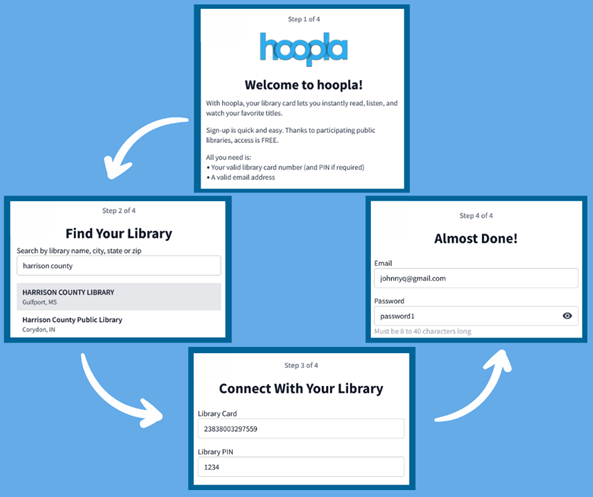
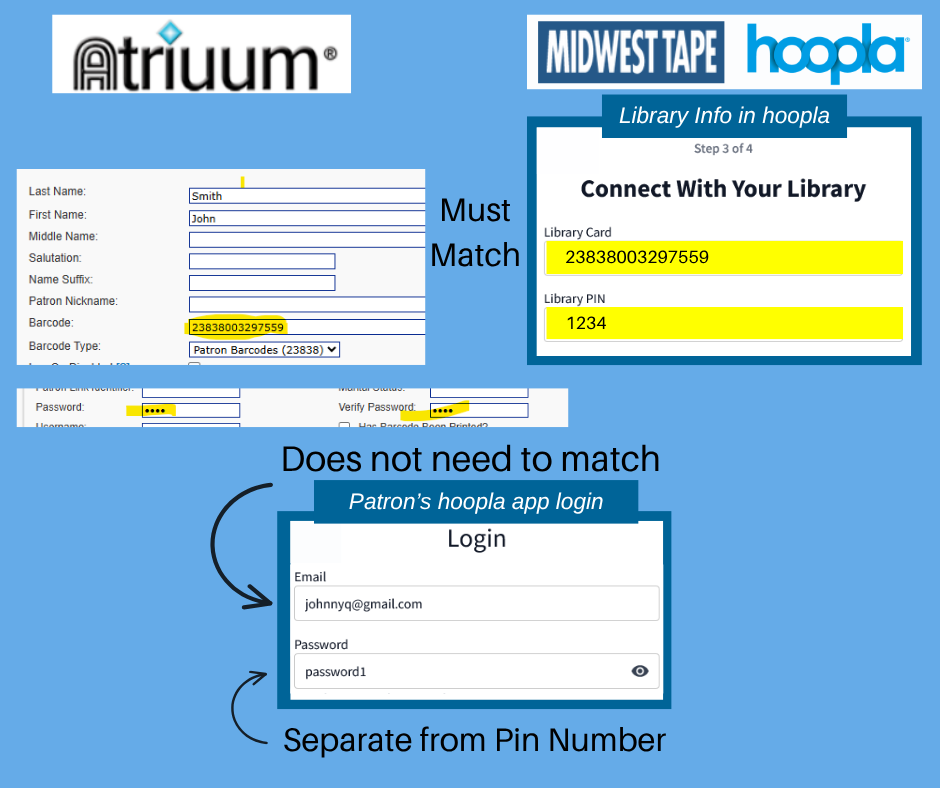
Hoopla works by connecting our patron’s library card information to their system. Patrons create an account with Hoopla with an email and password and then register their library card and library pin number.
Each Hoopla account must have its own email address. This is especially important for families where children may not have their own email address.
Library cards can only be connected to one Hoopla account.
Types of Hoopla Borrows
Instant - These items are available through the pay-by-use terms of Hoopla. Instant allows for simultaneous use by multiple borrowers. Each patron is allowed four checkouts per month. Daily access to the Instant titles is limited by budget. Our yearly budget is divided into the number of days per month and that amount is what is allowed for the day.
Flex – Unlike Instant titles, Flex titles are not simultaneous-use copies; that is, only one person at a time may borrow a Flex title. If a copy is out on loan, it cannot be borrowed again until returned. If a title is currently out on loan, you may place a hold on the title. These items are those the library pays for the rights. Each patron is allowed four checkouts per month. Flex titles are not affected by our budget cap but they are affected by holds and demand.
BingePass – Give you unlimited access to a curated collection of items with a single borrow. Content is created by Hoopla. Current passes include The Great Courses, Curiosity Stream, Children’s Hellosaurus and magazines.
Bonus Borrows– Checkout perk offered by Hoopla during the last week of each month. These checkouts do not count against the patron’s monthly allotment of checkouts nor the library’s budget.
Setting up a Hoopla Account
Help! I got an error message on Hoopla
Sometimes patrons will receive an error message when attempting to check out a book or sign-up. Don’t panic! Here is a list of common error messages. Some will require you to contact the library. Visit Hoopla’s help page (https://www.hoopladigital.com/help) for additional information.
The collective daily borrow limit set by your library has been reached and will reset at midnight. Please browse and add titles to favorites so you can easily access them after midnight. This is the most common error message for Hoopla. The library has an overall budget for Hoopla that is divided into a monthly, then daily budget. Once this budget has been reached for the day, an error message will pop up when attempting to check out. The best way to avoid this is by using Hoopla as early in the morning as possible.
Sorry, our lending policy does not allow you to borrow this title. For further assistance, please contact the library. This content restriction is most commonly due to the patron classification on the library card and the age rating on the item, i.e. a juvenile attempting to borrow materials classified as adult.
Sorry, but it appears you have a fine on your account. Please contact your local library at https://harrison.lib.ms.us/libraries/ to get this corrected. If a patron’s fines are higher than $5, they will not be able to use their library card. Library fees can be paid in person at any of our Harrison County Libraries.
Sorry, it appears that something is wrong with your library card or PIN. Please double check your info in settings and if you still have issues contact your local library at https://harrison.lib.ms.us/libraries/ for support. Every year library cards “expire”. This means that the library wants to verify patron contact information. If a library card has been replaced recently or a pin number reset, patrons will need to log into Hoopla and change the library account information under settings.
You have met your monthly lending limit of 4 titles. Please continue to browse and add to your favorites. See you next month. The Hoopla budget allows patrons to check out four titles a month for instant and four titles at a time for flex. The number of checkouts resets on the first of every month. For more movies or TV shows, please check Kanopy (https://harrisonlib.kanopy.com/.
Sorry, this content isn’t available right now. The link you followed may have expired, or the page may only be visible to a specific audience. This message will be received when an item is no longer available through Hoopla. Some titles have licenses that expire after 12-months, 24-months, or 26 borrows; once those criteria are met, the item is no longer available unless the library system purchases another license.
Your library card has already been registered. Please log into your hoopla account, or contact the library. The library card number being used to sign up already has an associated hoopla account.
Troubleshooting tips
Do not return and re-borrow as a troubleshooting step. The additional checkout will count toward the monthly limit.
When contacting the library please explain, as exact as possible, the error message that was received.
If contacting via email, including screenshots can be very beneficial.
Assisting with Hoopla at desk:
- Confirm what the error message says – this will determine next steps
- Verify patron card is not expired
- Make sure fines are less than $5
- Ensure there are no overdue items
- Ask if patron has updated library card number or pin recently; if so, was that updated in the hoopla settings?
- Check for incorrect information in the Patron Record Username field – it needs to match the barcode field
- If it appears that the issue may be a technical problem, have the patron uninstall and reinstall the app.
- “I’m sorry, but at this point I have exhausted all I know to do. I will escalate your issue to someone at HQ.”
- Forward patron information, with as much detail as possible, to Carrie Turner (turner@harrison.lib.ms.us) or Gus Wilson (g.wilson@harrison.lib.ms.us) 228-539-0110.
Updating Library/Pin Number - basic instructions